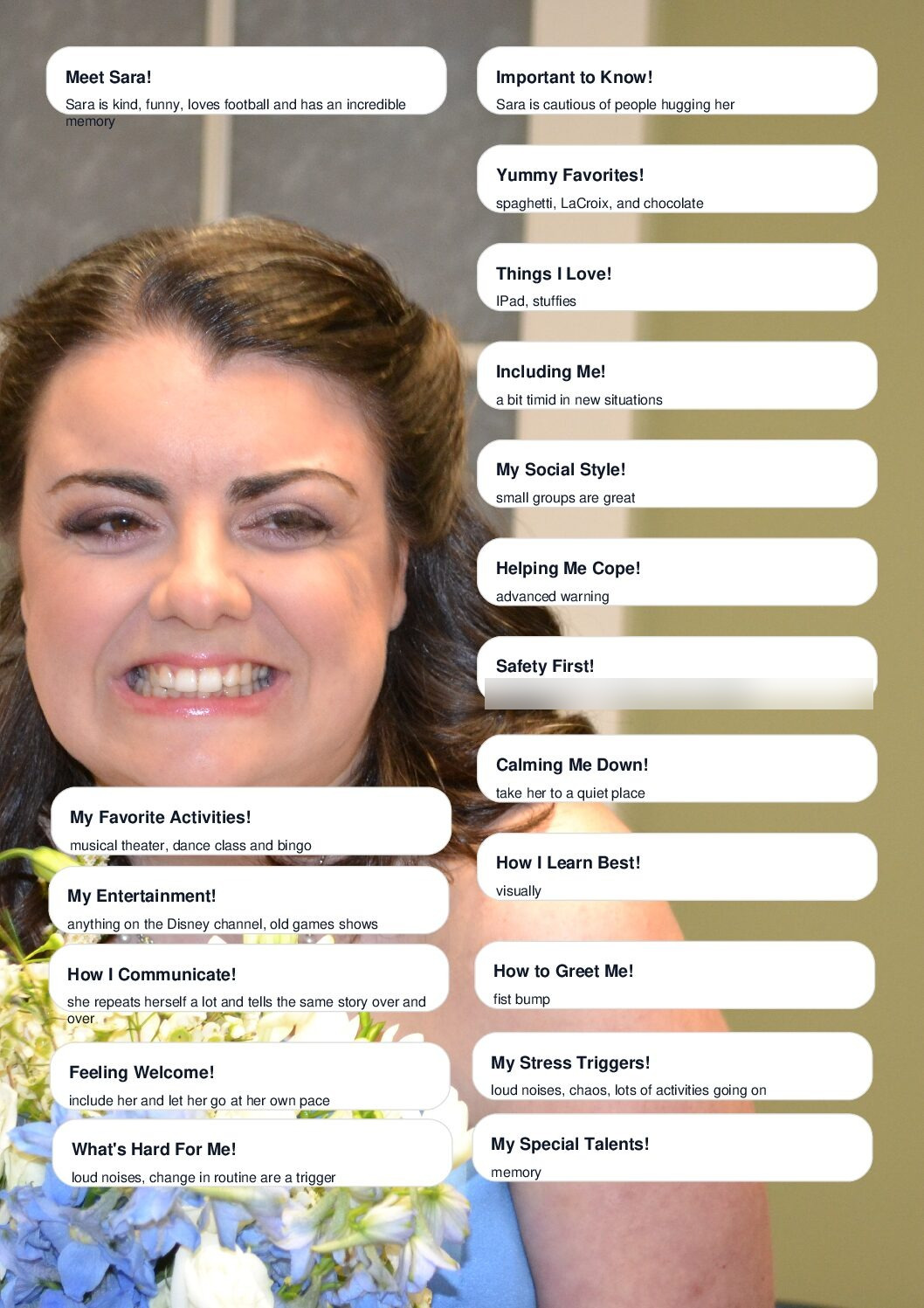
An All About Me page is a one-page introduction to your child that teachers, caregivers, and first responders can read in a minute. Start with your child’s strengths, then add only what your family wants to share. You can make one for free, with no account, using Stella’s All About Me Creator at askstellanow.org/resources.
See an example
If you would rather watch first, here is a short video that shows how the tool works.
Watch on YouTube: All About Me Page: A One-Page Sheet for Your Special Needs Child
What is an All About Me page?
You already carry a lot of knowledge in your head. You know how your child says hello, what a hard day looks like, and what helps them feel safe. A new teacher, coach, or caregiver does not have that context yet.
An All About Me page puts the most important parts of that knowledge on a single sheet. It usually starts with a clear photo, then short notes in simple language. Think of it as a friendly introduction, not a full medical file or a long IEP.
Why does a one-page sheet help?
A new person does not have time to read a binder. A one-page sheet can help a teacher, sitter, or coach start on the right foot. If your child cannot explain what they need in a crowded or stressful moment, that page can help a first responder step in more safely.
Keep it short on purpose. Two clear sentences are easier to use than a long paragraph.
How do I make one for free?
The All About Me Creator is a free tool from Ask Stella Now, and Stella is free for every family. You do not need an account. More than 65,000 parents across the U.S. have used Stella.
Here is how to build your page:
- Open the Resources page at askstellanow.org/resources and click Create Yours Here.
- Walk through the short questions. Write a brief answer, about one or two sentences, so a stranger can read it quickly.
- Skip any question that does not fit, or that you do not want on the page. Skipped questions stay off the final sheet.
- Add a photo where your child’s face is clear and easy to recognize. The tool accepts PNG, JPEG, or GIF files under 5 MB.
- Review your answers, then generate the sheet. You can drag the text bubbles so your child’s face stays visible. Put the most urgent notes, such as safety and how your child communicates, near the top.
- Download the PDF. Print copies, and save one on your phone.
You can come back later and make a new page as your child grows.
What should I include?
Start with strengths. People should meet the child you love, not only a list of challenges. After that, add only what would help someone support your child well.
- How your child communicates. Do they use words, signs, a device, or short phrases? What should someone know before they assume your child is not listening?
- Sensory needs. What is hard, such as loud noise, bright lights, crowded rooms, or a sudden change in routine? What feels comfortable?
- Calming strategies. What actually helps? A quiet space, a favorite item, a short walk, or a simple phrase you use at home can make a real difference.
- Medical notes. Include only what a helper would need in a hurry, such as an allergy or a condition they should not miss. You do not have to share a full medical history.
- Emergency contacts. A first name and a phone number can help in an urgent moment. You decide whether every copy needs this, or whether a school copy and an emergency copy should look a little different.
Other short notes that often help: how to greet your child, what makes them feel welcome, and any safety reminder you want seen first.
How do I keep private details private?
This page belongs to your family. You choose what goes on it, and you choose who receives a copy.
A few simple privacy tips:
- Skip anything you are not comfortable sharing.
- Leave off your street address, especially on a copy that may be posted or passed around.
- You can make more than one version. A classroom page can focus on learning and communication. An emergency page can focus on safety and how to help in a crisis.
Your answers are not stored on a server. After you download the PDF, you decide where it goes.
What is a QR code or key fob for?
A printed page is a great start. A QR code or a key fob can help when there is no time to hunt for a folder. A teacher, a neighbor, or a first responder can scan it and see your child’s All About Me details quickly. If you use a key fob or a backpack tag, keep the same privacy rules in mind. Share only what that person would need in the moment.
Where should I keep copies?
Print more than one. Useful places include a school backpack, a sitter or caregiver, an emergency bag, and the car. Keep the PDF on your phone too.
When something changes, make a fresh page and replace the old copies.
Frequently asked questions
Does the page have to include a photo?
A photo helps a new person recognize your child quickly, so it is a good idea when you have one you are comfortable sharing. If you would rather leave it off, you can still share the words that matter most.
Can I skip questions?
Yes. Skip any question that does not apply or that you do not want on the sheet. The final page will only include what you choose.
Can I use this at school, child care, or a new activity?
Yes. Families share All About Me pages with teachers, aides, therapists, coaches, sitters, and community group leaders. Give it to the people who spend time with your child, and update it when their needs change.
Is the All About Me Creator really free?
Yes. The All About Me Creator is free for every family, and Stella is free too. There is no account to create and no fee to download your page. Start at askstellanow.org/resources. For other questions about IEPs, waivers, therapies, and local help, you can also ask Stella at askstellanow.org.
Is my child’s information stored online?
The tool is built so your answers are not stored on a server. After you generate and download the PDF, you control who sees it.
Do I need an account?
No. You can open the tool, build the page, and download it without signing in.
You know your child best. A one-page All About Me sheet simply helps the rest of the world catch up a little faster, with care and respect. Make yours free at askstellanow.org/resources.